The spiral of hacks
Let me paint a picture. You use Obsidian. You want your notes in git. You have multiple devices, including an iPhone. Now go and make it work.
If you’ve tried this, you already know the journey. Working Copy on iOS with manual pull/push routines. Apple Shortcuts that break every other iOS update. The Obsidian Git plugin that doesn’t work on mobile. iCloud sync with a cron job on your Mac that commits - until your Mac goes to sleep. .git folder symlink hacks that corrupt your index on the third Tuesday of every month. a-Shell. iSH. Termux.
I went through most of these over a few weeks. Each one was another lap on the same spiral: find a hack, configure it, discover an edge case, patch it, discover another edge case, add another moving part. The classic implementation death spiral where every fix introduces the next problem.
At some point I got tired of lapping and stepped back to look at the problem as a whole.
Decompose, don’t accumulate
The Obsidian ecosystem already has reliable sync. The Remotely Save plugin works on every platform including iOS, supports multiple backends - S3, WebDAV, Dropbox - and handles all the hard parts of cross-device file synchronization. The “sync Obsidian across devices” problem is solved. I don’t need to touch it.
What I actually want is separate: a git history of my vault. Not git-on-every-device. Not git-as-a-sync-mechanism. Just a clean commit history that tracks every change, gives me diffs, and lets me revert things.
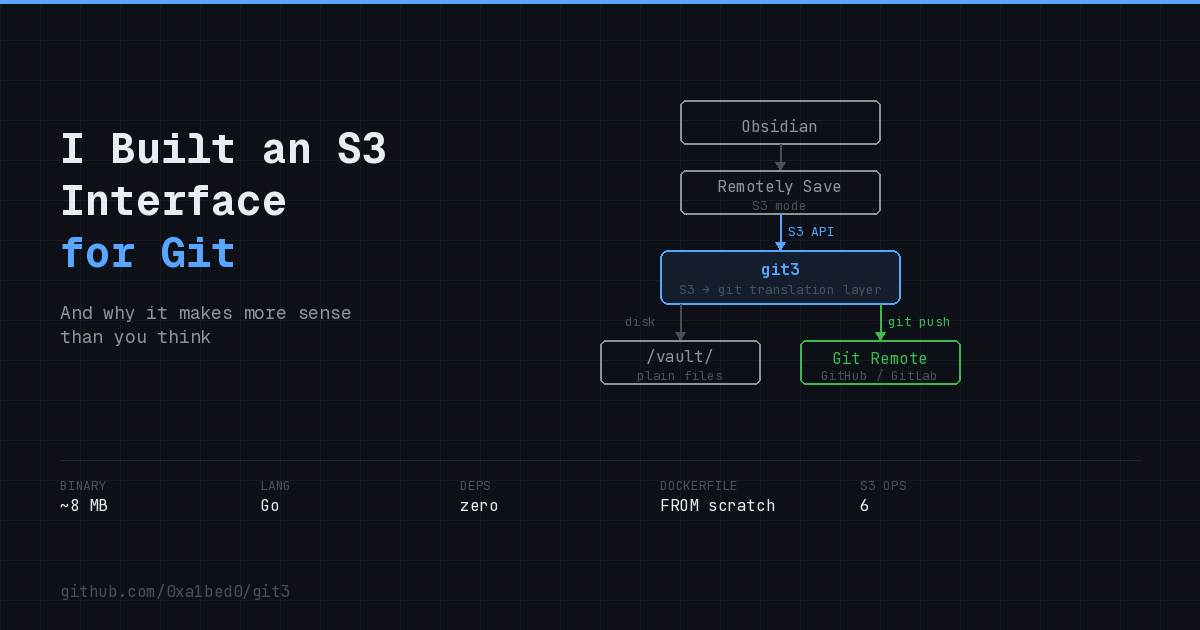
Once I separated these two concerns, something important became clear: Obsidian and git shouldn’t even know about each other. They’re separate concerns. What I need is a layer in between - a file server that Remotely Save can talk to, which also happens to commit to git. The two sides don’t need to be coupled at all.
So I had my architecture: a file server in the middle, Remotely Save on one side, git on the other. Now I just needed to build it.
The “just install things” trap
This is where it got interesting. I shared the idea with developer friends and threw it at a few LLMs. The responses were remarkably consistent: “Great idea! Just install nginx with WebDAV, add inotifywait to watch for file changes, write a bash script that runs git commit, wire it up with systemd, and you’re good to go.” Or: “Just deploy minio, mount the volume, set up a cron job with a git push script.” Or some variation with five components and three config files.
Each suggestion made sense in isolation. Each tool is well-known, well-documented, “easy.” But zoom out and look at what you’re actually deploying: a base image with nginx, a WebDAV module or a minio instance, git, bash, inotifywait or systemd watchers, a timer unit, and a handful of scripts and config files gluing them together. That’s a lot of moving parts for “just push files to git.”
This is the trap. Developers - and LLMs trained on developer patterns - default to reusing existing tools. It feels responsible. It feels pragmatic. But they define “easier” as “uses things I already know how to install.” The total system complexity - the thing you actually live with, maintain, debug at 2 AM - never enters the equation.
I think the right definition of “easier” is fewer moving parts in production. One process. One config. No external dependencies. If that means writing more code upfront, so be it. Writing code is a one-time cost. Operational complexity is forever.
Implement the minimum protocol
With that framing, the architecture decision becomes obvious. Remotely Save already speaks S3. Instead of deploying a real S3 server (or WebDAV server, or anything else) and bolting git onto it, I can implement just enough of the S3 protocol to satisfy Remotely Save, with git baked directly in. Not two things wired together. One thing.
The S3 protocol is huge. But Remotely Save uses a tiny subset. The entire API surface I actually need:
| Operation | What it does |
|---|---|
PutObject |
Write file to disk, schedule git commit |
GetObject |
Read file from disk |
HeadObject |
os.Stat() |
DeleteObject |
Remove file, schedule git commit |
ListObjectsV2 |
filepath.Walk(), skip .git |
HeadBucket |
Return 200 |
Six endpoints with AWS Signature V4 on top. A few hundred lines of Go.
For git, I used go-git
- a pure Go implementation. No shelling out to a system git binary. No dependency on it being installed. Clone, pull, add, commit, push - all in-process.
The result is a single static binary. ~8 MB. No runtime dependencies. The Dockerfile:
FROM scratch
COPY git3 /git3
ENTRYPOINT ["/git3"]
FROM scratch. Not even an OS. Just the binary.
Implementing my own minimal S3 server sounds rough - I know. But the source code of the entire thing - S3 protocol, git client, HTTP server, all of it - is smaller than the deployment configuration and glue scripts you’d need for the nginx + WebDAV + bash + git + systemd stack. Sometimes writing a focused piece of software is genuinely less work than configuring a pile of general-purpose tools.
The debounce
One detail worth mentioning. When Remotely Save syncs, it fires PUT requests one file at a time. A typical sync is 5-50 requests in quick succession. A naive implementation would create a commit per file - useless noise in your history.
git3 debounces: it starts a timer on the first write, resets it on every subsequent write, and commits only when the timer expires (default 10 seconds of silence). One sync batch = one commit. Same pattern as search-as-you-type, applied to git operations. A Go channel and time.After - nothing exotic.
It also pulls periodically (default every 60 seconds), so changes pushed directly to the repo - from your desktop git client or GitHub’s web editor - show up on all devices on the next Remotely Save sync cycle.
The deployment
services:
  git3:
    image: ghcr.io/0xa1bed0/git3:latest
    restart: unless-stopped
    environment:
      - ACCESS_KEY=your-access-key
      - SECRET_KEY=your-secret-key
      - GIT_REPO=https://github.com/you/vault.git
      - GIT_TOKEN=github_pat_xxx
      - DEBOUNCE=10
      - PULL_INTERVAL=60
One container. A few environment variables. ACCESS_KEY and SECRET_KEY are credentials you make up to authenticate requests - they’re not AWS anything.
No persistent storage needed. On startup, if the vault directory is empty, git3 clones the repo. Kill the container, restart it anywhere else, it rebuilds from git in seconds. Runs comfortably on free-tier ephemeral hosts - Fly.io, Render, whatever gives you a container.
Then it clicked
I built git3 to sync Obsidian. That was the whole point. But after a couple of days of using it and showing it to people, something else became clear.
An S3 interface for a git repository is useful far beyond note sync.
Here’s why. When you need to get a file into a git repo, the “proper” way involves installing git, authenticating (SSH keys, credential helpers, tokens), cloning the repo, staging, committing, pushing. For a developer at their workstation, this is fine. But for a CI/CD pipeline, a backup script, an automated system, or a non-technical person - it’s a lot of ceremony for “put this file over there.”
S3 is a dramatically simpler interface for the same operation. It’s just an HTTP request with auth headers. No state to manage, no repository to clone, no working tree to maintain. Most APIs, CI/CD systems, applications, and file manager clients already know how to talk to S3. It’s not that S3 is some universal standard everyone knows - it’s that throwing a file over HTTP is about 1000x easier than building a proper git integration.
That reframing opens up scenarios I hadn’t considered:
CI/CD artifact versioning. Your pipeline produces build artifacts, config files, reports. Instead of writing git commands in your pipeline scripts or losing history in plain S3, just PUT them to git3. Every artifact is committed automatically. Full history, diffs, rollback - via an HTTP call your CI already knows how to make.
Non-technical collaboration. You have a git repo with documentation or config files. Someone who doesn’t know git needs to update them. You don’t need to teach them git. Give them S3 credentials to your git3 instance. They read and write files through any S3-compatible client. You receive the changes through your normal git flow.
Config and document backups. Files scattered across systems that you want version-controlled. Dotfiles, documents, generated configs. Instead of installing and authenticating git on each machine - just push to an S3 endpoint. They’re in your repo. Every change tracked.
Quick file exchange. Need to throw something into a repo from a system where git isn’t installed? aws s3 cp file.txt s3://vault/file.txt --endpoint-url https://your-git3.dev. Done. It’s in your repo. Need someone to grab something from the repo? They don’t need to learn git - they read from what looks like a normal S3 bucket.
Maybe git3’s next update should be an SFTP interface too. Make it a truly universal write gateway for git - not just for apps that speak S3, but for anyone with a file manager.
Was it worth implementing from scratch?
When I started, I didn’t think it would be its own project. I thought it’d be a 200-line script. But proper SigV4 auth, debounce logic, empty directory cleanup after deletes, go-git integration, graceful error handling, multi-arch Docker builds - it adds up.
But the entire codebase - S3 protocol implementation, git client, HTTP server, debounce logic, all of it - is still smaller than the configuration files, deployment scripts, systemd units, and glue code you’d need for the “default route” of reusing existing servers and deploying multiple subsystems. One Go codebase that compiles in seconds versus a stack of tools that each need their own config, their own logs, their own failure modes, their own upgrades.
Sometimes implementing a focused piece of software is genuinely less total effort than assembling and maintaining a stack. You just have to define “easier” correctly.
github.com/0xa1bed0/git3
- single binary, Docker image at ghcr.io/0xa1bed0/git3:latest, licensed under ELv2.